I Built a Claude Code Hook That Auto-Names My Terminal Tabs
How a small DX annoyance led me to Claude Code's hook system — and a 60-line bash script that saves me context-switching headaches every day.
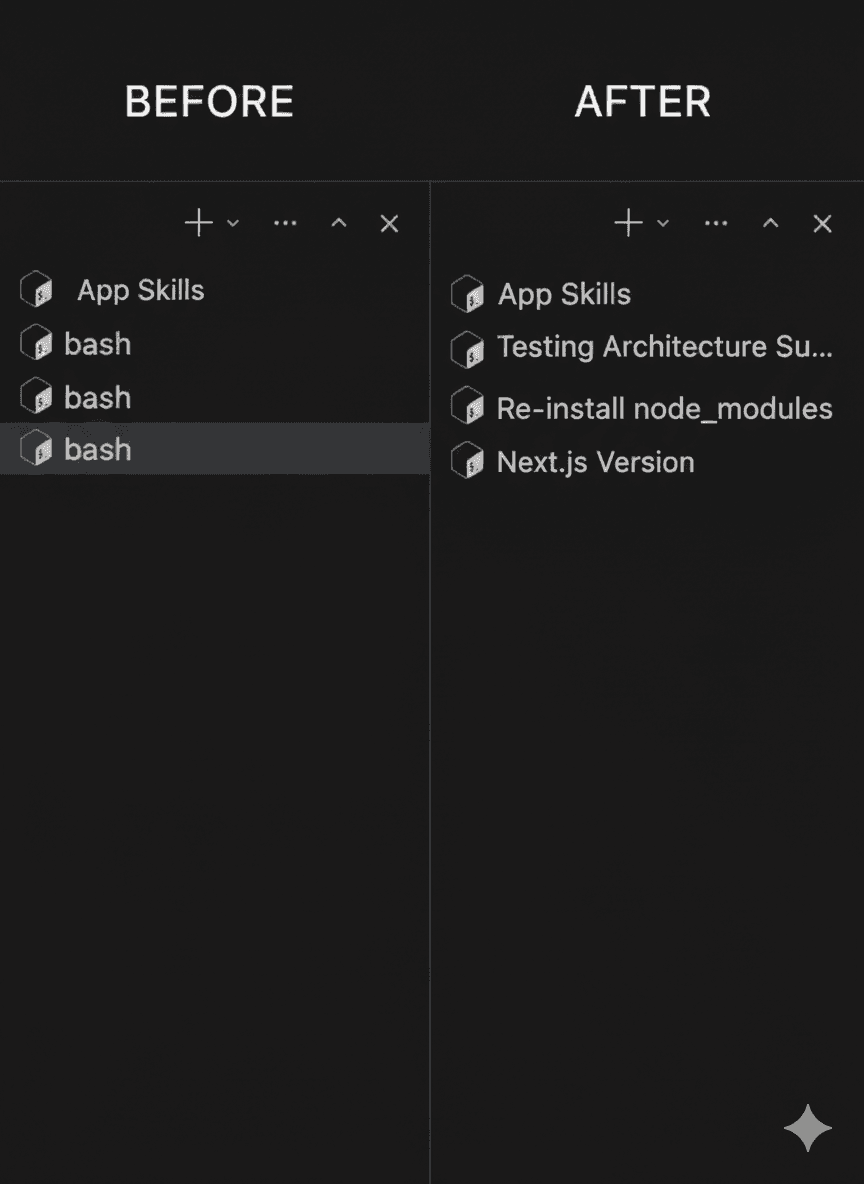
If you use Claude Code inside an IDE like Cursor, you probably run multiple sessions at once. One terminal is refactoring auth middleware. Another is debugging a CSV parser. A third is setting up database migrations.
And every single tab says "node".
I got tired of squinting at identical tabs and mentally tracking which session was which. So I built a Claude Code hook that automatically names each terminal tab based on what the conversation is actually about.
The result: my tabs now say things like 🤖 Site Builder Implementation or 🤖 Fix Auth Middleware — updated in real time as the conversation evolves.
Here's how I built it, what I learned about Claude Code's hook system, and how you can set it up in under five minutes.
The Problem
Claude Code runs as a Node process inside your IDE's integrated terminal. That means every session gets the same generic tab name — typically "node" or "bash". When you're running two or three sessions in parallel, the only way to tell them apart is clicking through each tab to see what's inside.
It's a small friction, but it adds up. Every time you switch tabs, you're spending a few seconds re-orienting. Multiply that by dozens of switches per day across multiple sessions, and it's a real productivity drain.
Why Hooks (Not a Wrapper Script)
My first instinct was to build a wrapper script around the claude command — capture terminal output with script, strip ANSI codes, poll for new content, and call an API to generate a title.
It worked, but it was ugly. Capturing a TUI's raw output means dealing with escape sequences, cursor movements, and Ink rendering artifacts. The polling approach was fragile and resource-wasteful.
Then I remembered: Claude Code has a hook system.
Hooks let you run arbitrary commands at specific lifecycle events — when a session starts, when Claude finishes a response, before a tool runs, etc. The Stop hook fires after every completed response and receives session metadata via stdin, including a path to the full conversation transcript.
No output capture. No ANSI stripping. No polling. Just clean, structured data handed to your script at exactly the right moment.
How It Works
The architecture is simple:
- Claude Code finishes a response → fires the
Stophook - The hook script reads the transcript from the JSONL file Claude Code maintains
- Calls
claude -p(the CLI's one-shot prompt mode) to generate a 2–5 word title - Sets the terminal tab name via an OSC escape sequence
The beauty of using claude -p is that it reuses whatever authentication you already have — OAuth, API key, doesn't matter. No separate credentials needed.
Key Implementation Details
Reading the Transcript
The hook receives JSON via stdin with session metadata:
{
  "session_id": "1de24cc9-...",
  "transcript_path": "/Users/you/.claude/projects/.../session.jsonl",
  "cwd": "/Users/you/Projects/my-app",
  "hook_event_name": "Stop"
}
The transcript itself is a JSONL file — one JSON object per line. Extracting conversation context is a jq one-liner:
TRANSCRIPT=$(tail -100 "$TRANSCRIPT_PATH" | jq -r '
  select(.type == "human" or .type == "assistant")
  | if .type == "human" then
      "User: " + (.message.content | if type == "array"
        then map(select(.type == "text") | .text) | join(" ")
        else . end)
    else
      "Claude: " + (.message.content | if type == "array"
        then map(select(.type == "text") | .text) | join(" ")
        else . end)
    end
' | head -c 3000)
Generating the Title
Instead of managing API keys and curl calls, the script shells out to claude itself:
TITLE=$(timeout 15 claude -p \
  "You name terminal tabs. Generate a 2-5 word title for this session.
   Reply with ONLY the title.

   Session: $TRANSCRIPT" \
  --model claude-haiku-4-5-20251001)
Haiku is fast enough that the title appears within a second or two of Claude's response completing. And since it uses your existing auth, there's zero setup friction.
Setting the Tab Name
Terminal tab names are set via an OSC (Operating System Command) escape sequence:
printf '\033]2;🤖 %s\033\\' "$TITLE" > /dev/tty
One catch: Cursor and VS Code override this by default. You need to tell the terminal to respect escape sequences by adding this to your settings.json:
{
  "terminal.integrated.tabs.title": "${sequence}",
  "terminal.integrated.tabs.enabled": true
}
Without "${sequence}", the IDE ignores your escape code and keeps showing "node".
Avoiding Redundant API Calls
You don't want to regenerate the title on every single turn. The script tracks state per session using a simple temp file:
STATE_FILE="$STATE_DIR/$SESSION_ID"
It generates a title on the first response, then only refreshes every 5 turns in case the conversation has shifted direction. This keeps costs negligible — a fraction of a cent per session.
Setup
1. Save the hook script:
mkdir -p ~/.claude/hooks
curl -o ~/.claude/hooks/tab-namer.sh \
  https://github.com/als15/claude-tab-namer/raw/main/tab-namer.sh
chmod +x ~/.claude/hooks/tab-namer.sh
2. Register the hook in ~/.claude/settings.json:
{
  "hooks": {
    "Stop": [
      {
        "matcher": "",
        "hooks": [
          {
            "type": "command",
            "command": "bash ~/.claude/hooks/tab-namer.sh",
            "timeout": 15000
          }
        ]
      }
    ]
  }
}
3. Update your Cursor/VS Code settings:
{
  "terminal.integrated.tabs.title": "${sequence}",
  "terminal.integrated.tabs.enabled": true
}
4. Restart Claude Code. Send a message, wait for the response to complete, and watch your tab name update.
Full source code is on GitHub: github.com/als15/claude-tab-namer
What I Learned
Claude Code hooks are underutilized. Most people I've talked to don't know they exist. The hook system is surprisingly powerful — you get clean lifecycle events with structured metadata. Auto-naming tabs is just the beginning. You could build hooks that log session summaries to Notion, post progress updates to Slack, or auto-commit when Claude finishes a coding task.
Small DX wins compound. This script saves me maybe 5–10 seconds per tab switch. But across a full day of multi-session work, it meaningfully reduces the cognitive overhead of context-switching. The best developer tools don't do flashy things — they remove small frictions you didn't realize were slowing you down.
claude -p is a hidden gem. Being able to make one-shot Claude calls from any script, using your existing auth, opens up a lot of possibilities for shell-level AI tooling. I've started using it for commit message generation, quick code reviews, and other small automations.
If you try this out or build your own Claude Code hooks, I'd love to hear about it — find me on LinkedIn.